Sunday, September 23, 2018

Alt-TAB behavior in Ubuntu's Gnome Shell

Default behavior group TAB of the same app is a pain for me. Changing this to show all individual windows is as follows.

  • Open dconf-editor
  • Go to org/gnome/desktop/wm/keybindings
  • Move the value 'Tab' from switch-applications to switch-windows
  • Optionally move 'Tab' from switch-applications-backward to switch-windows-backward
  • If you want switch-windows to work across desktops, not just in the current desktop, you can also uncheck org/gnome/shell/window-switcher/current-workspace-only
  • Close dconf-editor
  • Press F2, then type r to restart Gnome.

The last step does not always appear to be necessary, but it should not hurt (especially since it does not close any of your running applications).

[ trackback ]

Wednesday, May 9, 2018

Keepass and Cygwin's ssh

Since having Cygwin installed anf fully operational, I've let go of PuTTY a long time back.

But Keepass keeps the default ssh:// handler dependent on PuTTY.
Here is how to change it, and use Cygwin's plain old 'ssh' com MinTTY terminal.

On Keepass, Tools > Options > Integration, click 'URL Overrides' on the bottom right.


Untick the default ssh handler.

Next, create a new entry, with:

Scheme: ssh
URL override:
cmd://C:\cygwin\bin\mintty.exe -i /Cygwin-Terminal.ico -h error -e /usr/bin/bash -l -- ssh -l {USERNAME} -p {BASE:PORT} {BASE:HOST}
(adjust paths accordingly)

This has one caveat, where you need to always define the port number on the URL field, and not leave it blank...

example: ssh://host.name:22

One option is to create a wrapper for ssh, so it can handle URL formatted arguments (protocol://username@hostname:port), split it accordingly, and handle all the possible omissions.... but that's for another post....

Thursday, July 13, 2017

FreeDNS dynamic DNS update client (revisited)

Back in 2011 I posted a tweaked script from afraid.org (of FreeDNS) - named dnsactual.sh - to update your IP addresses dynamically in this DNS service provider.

Today I reviewed it, and I further tweaked it, removing dependencies for external web sites.
Before, a GET to http://ipecho.net/plain (or other similar site) was required to get you your public IP address.
But if the site is unavailable, you could get in trouble and end up shooting yourself on the foot, messing up your dynamic DNS entries.

Thanks to OpenDNS (or the omnipresent Google), there is a way to get your IP address with a simple 'dig' query :-)

dig +short myip.opendns.com @resolver1.opendns.com
dig TXT +short o-o.myaddr.l.google.com @ns1.google.com [ trackback ]

Now the updated script. Feel free to used, edit, magle, whatever!
This logs any updates to syslog, and appends to file, for historic reasons.
I know it could have a lot more health checks for error handling, but for me it's enough.

#!/bin/bash

FQDN="## your own FQDN on FreeDNS ##"
TOKENS="## get your own##"
PATH=/bin:/sbin:/usr/bin:/usr/sbin
LOGGER="logger -t FREEDNS"

CacheIP=$(dig +short $FQDN @ns1.afraid.org)
CurreIP=$(dig +short myip.opendns.com @resolver1.opendns.com)

if [ "$CurreIP" != "$CacheIP" ]
then
  for A in $TOKENS ; do
    $LOGGER `curl -k -s "https://freedns.afraid.org/dynamic/update.php?$A"`
  done
  echo "`date +%Y%m%d-%H%M`: New IP address $CurreIP (old was $CacheIP)" >> /var/log/freedns.log
else
  $LOGGER "Public IP hasn't changed..."
  # the 'else' section is just to validate if the script is actually running, not really needed once tested
fi

Tuesday, March 8, 2016

External NTP sync for Domain Controllers (refresh)

Waaaay back in 2012, I etched a note on how to sync Domain Controllers to an External NTP source.

Now, back to the future (not so near... 2013), it got *A LOT* simpler...

w32tm.exe /config /manualpeerlist:"0.#country_code#.pool.ntp.org 1.#country_code#.pool.ntp.org" /syncfromflags:manual /reliable:YES /update

And that's all, folks!

[ trackback ]

Friday, April 17, 2015

Auto Save Keepass database

Keepass is one of THE best tools ever for any IT personna.

But if, as I usually do, you don't save it regularly, when your laptop runs out of battery, all your changes will be lost - I have my laptop on hibernate when not using it (SSD rules!!).

And then there's this lifesaver. This is not my doing, but it's a great KP keepsake :-) No plugin, just builtin KP triggers.

1. In KeePass Password Safe, click on Tools menu and select Triggers.

2. Click on Add button to open Add Trigger wizard.

3. Enter a name for the new trigger, such as Auto Save Database, then click Next. Left the “Enabled” and “Initially On” check boxes ticked, and “Turn off after executing actions (run once) check box unticked.


4. On the “Events” tab, click on Add button.

5. Select User interface state updated in the “Event” drop-down list, which evaluates to true when KeePass has finished updating the state of the user interface (menus, toolbar, …), including after most user actions, like adding / editing / deleting entries and groups, etc. Then, click OK, follow by Next in the wizard.


6. Optional: On the “Conditions” tab, click on Add button.

7. Optional (if perform step above):Select Active database has unsaved changes in the “Condition” drop-down list, and click OK, follow by Next in the wizard.


8. On the “Actions” tab, click on Add button.

9. Select Save active database in the “Action” drop-down list, and click OK.


10. Click Finish, follow by OK.

    Thursday, October 30, 2014

    mRemoteNG takes up to 30sec to start when cut from Internet

    mRemote is your one-stop-shop for all your remote connection needs (telnet/ssh/rdp/ica).

    But when connected on a network with no internet connection, it takes a while to load... 20~30 sec.

    "mRemoteNG and many of its associated files are digitally signed with a certificate from Comodo. Microsoft calls this technology Authenticode. When the .NET Framework starts mRemoteNG, it verifies the certificate revocation list (CRL) from Comodo to verify that the certificate is still valid.

    This is a security feature and is used to verify that mRemoteNG has not been tampered with."


    "The checking is all handled by the .NET Framework before mRemoteNG even loads."
    by rmcardle, coder of mRemoteNG.

    But this can be disabled, if needed.

    Add
    <runtime><generatePublisherEvidence enabled="false"/></runtime>
    to the end of mRemoteNG.exe.config file, inside the <configuration> tag, located in the directory where mRemoteNG.exe is installed/located. 

    [ trackback ]

    Tuesday, August 5, 2014

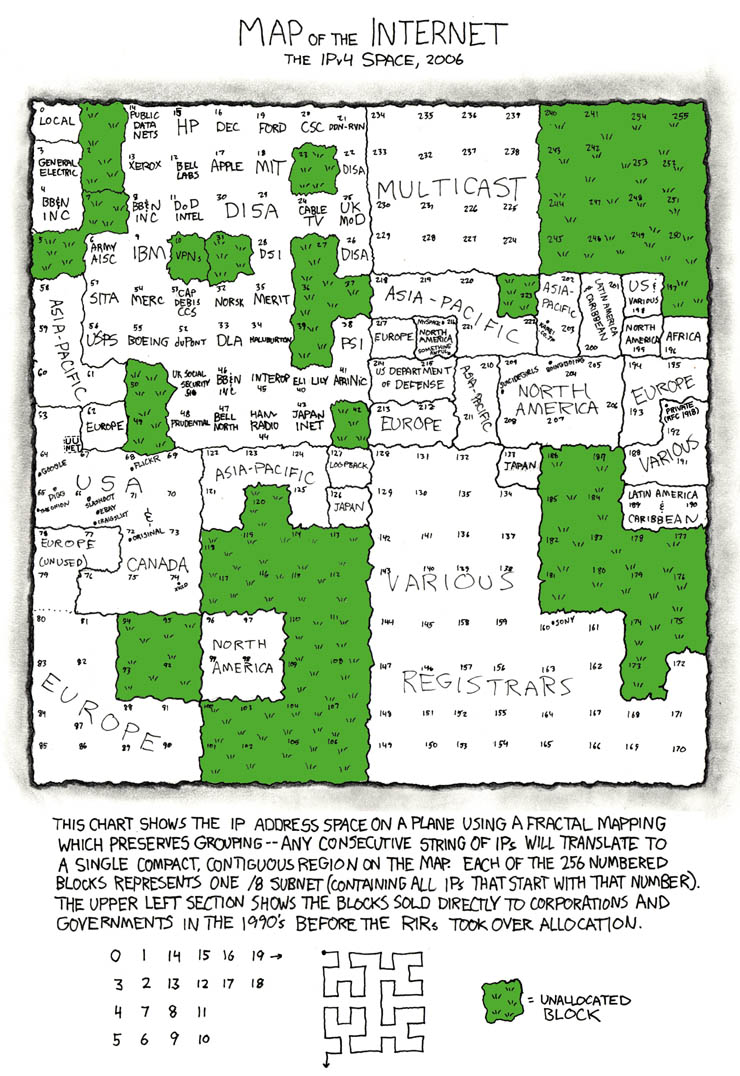
    Internet IP addressing map

    This one is an oldie revisited :-)

    Waaaay back then (2006), xkcd made an Internet IP address map.


    Someone made an update (@2011)... the change is... abyssal!